The Epson L380 Adjustment Program is a powerful service tool used to reset the waste ink pad counter, fix common errors, and restore your printer to working condition. If your Epson L380 shows a “Service Required” or blinking red light error, this tool helps you solve the issue instantly. This guide explains everything you need to know—including download instructions, how to use the tool properly, key features, troubleshooting tips, and a complete FAQ section.
Looking for other Epson reset tools? Visit our Epson Adjustment Program Master Guide to browse compatible resetter tools for multiple Epson printer models.
The Epson L380 Adjustment Program (adjprog.exe) is a reset tool used to clear the waste ink pad counter and fix the “Service Required” error. Download the program, run adjprog.exe, select your model, and perform the waste ink pad reset under “Maintenance.”
What Is the Epson L380 Adjustment Program?
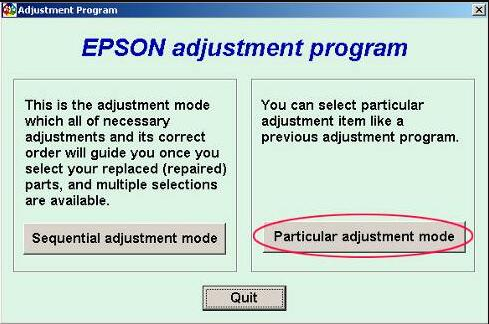
The Epson L380 Adjustment Program, also known as adj program epson or adjprog.exe, is an official-level maintenance tool used by service technicians. It provides advanced options such as waste ink counter reset, EEPROM reset, head cleaning, and other internal diagnostic controls. This resetter tool is often used when the printer stops working due to the ink pad reaching its limit.
Why the Epson L380 Shows “Service Required”
After a certain number of prints, the printer stores waste ink inside an absorption pad. Once the limit is reached, the system automatically locks printing for safety. This is when you see the warning:
- Service Required
- Ink pad is at the end of its service life
- Blinking red lights
The resetter tool clears the counter so your printer works again.
Features of the Epson L380 Adjustment Program
The reset tool provides multiple maintenance functions that make printer repair simple. Here are the highlight features:
- Waste ink pad counter reset
- EEPROM initialization
- Head cleaning and ink charge
- Paper feed adjustment
- Scanner motor testing
- Printer identification check
- EEPROM data backup/restore
- Compatible with Windows 7/8/10/11
Download Epson L380 Adjustment Program (Reset Tool)
The download link provides the latest working version of the Epson L380 resetter program. The file contains adjprog.exe and required configuration files.
File Contains:
- AdjProg.exe
- Model Configuration File
- Service Tool Resources
How to Use the Epson L380 Adjustment Program (Step-by-Step Guide)
Follow the steps carefully to reset your Epson L380 using the tool.
Step 1: Disable Antivirus (Important)
Because the file contains executable service commands, some antivirus programs mistakenly flag it. Disable antivirus temporarily before extracting.
Step 2: Extract the File
Use WinRAR or 7Zip to extract the downloaded ZIP file into a folder.
Step 3: Open AdjProg.exe
Locate the file named adjprog.exe and double-click to run it.
Step 4: Select Your Printer Model
Click “Select” → choose Epson L380 → click OK.
Step 5: Open “Maintenance”
In the menu, select “Particular Adjustment Mode” and choose “Waste Ink Pad Counter.”
Step 6: Reset Waste Ink Pad Counter
- Tick Main Pad Counter
- Click Check
- Click Initialize
Step 7: Restart the Printer
Turn off your printer → Wait 10 seconds → Turn it back on. The error should be cleared.
What Is a Waste Ink Pad and Why Does It Fill Up?
Every time the printer performs cleaning or maintenance, it releases excess ink into an internal sponge-like pad called the waste ink pad. Over time, this pad records usage through a digital counter—not actual physical ink level.
Once the counter reaches its limit, the printer locks to avoid overflow. The adjustment program resets the digital count so the printer can function again.
Epson Maintenance Box Resetter – Do You Need It?
Many users search for an epson maintenance box resetter, but the L380 does not use a removable maintenance box. Instead, it uses a built-in ink pad system. This means the L380 Adjustment Program is the correct tool for resetting the warning.
Benefits of Using the Epson L380 Adjustment Program
- Restores printer functionality instantly
- Saves time and repair costs
- Ideal for home and office maintenance
- Compatible with all major Windows versions
- Safe, lightweight, and easy-to-use
Common Problems Fixed by This Tool
- Red light blinking error
- Service required message
- Ink pad end-of-life warning
- Print queue locked or frozen
- Incorrect ink pad counter values
Troubleshooting: Program Not Opening / Error Fix
1. File Not Opening
Disable antivirus → Right click → Run as administrator.
2. Communication Error
- Use original USB cable
- Connect printer directly (no hub)
- Keep printer switched ON
3. Software Crashes
Re-extract the ZIP file and run again.
- Link to “Epson L3110 Adjustment Program Download”
- Link to “Waste Ink Pad Full Solution for Epson Printers”
External Authoritative Links
Related Epson Adjustment Programs
- Epson Adjustment Program Master Guide
- Epson L3110 Adjustment Program
- Epson L550 Adjustment Program
- Epson L1300 Adjustment Program
Frequently Asked Questions (FAQs)
1. What is the Epson L380 Adjustment Program?
It is a maintenance tool used to reset the waste ink pad counter and fix service-related printer errors.
2. Is the adjustment program safe?
Yes. It is widely used by technicians for printer servicing.
3. Why does my printer show “Service Required”?
Your waste ink pad counter has reached its limit and needs resetting.
4. What is adjprog.exe?
It is the executable file that runs the Epson L380 resetter program.
5. Does this tool support Windows 11?
Yes, it works on Windows 7/8/10/11.
6. Do I need an Epson maintenance box resetter?
No. The L380 does not use a maintenance box.
7. Can I use the reset tool multiple times?
Yes, there is no usage limit.
8. Will it affect my printing quality?
No. It only resets internal counters.
9. Should I replace the physical waste ink pad?
It is recommended if the pad is truly saturated.
10. The program is not detecting my printer—what to do?
Reinstall Epson drivers and connect using USB cable.
11. Can I reset Epson L380 without the Adjustment Program?
No. In most cases, the Epson L380 requires a compatible adjustment program or reset utility to clear the waste ink pad counter and remove the Service Required error.
Conclusion
The Epson L380 Adjustment Program is the easiest and most effective way to reset your printer, fix the “Service Required” error, and get your device working again. With adjprog.exe and the step-by-step instructions above, anyone can safely complete the reset process in just a few minutes. Save time, reduce repair costs, and keep your printer running smoothly.