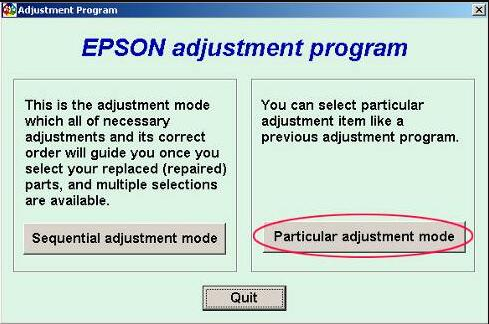
Epson L395 Adjustment Program is a common search term when this printer suddenly stops working, shows a service warning, or refuses to print even though it still powers on. For many users, the problem is not a dead printer. It is an internal maintenance lock, and that is exactly where the adjustment program becomes useful.
The Epson L395 is a popular EcoTank all-in-one printer used for home, office, and everyday document printing. Since it is designed for long-term use, many owners prefer to repair or reset it instead of replacing it right away. When the printer reaches its internal waste ink counter limit, a reset utility is often the solution users start looking for.
This guide explains the Epson L395 adjustment program in a practical and technical way. You will learn what the tool does, when to use it, how to download it safely, how to reset the printer step by step, and what to do if the reset does not solve the problem.
What Is Epson L395 Adjustment Program?
The Epson L395 adjustment program is a service utility designed to access internal printer maintenance settings. Its main purpose is to help check and reset maintenance-related values, especially the waste ink pad counter.
Inside the printer, an internal counter tracks ink used during cleaning cycles and maintenance routines. Over time, this counter reaches a predefined limit. When that happens, the printer may display a service message and stop printing until the issue is addressed.
The adjustment program communicates with those protected settings. In the most common use case, it is used to reset the waste ink counter so the printer can return to normal operation.
Why People Search for Epson L395 Adjustment Program
Most users search this keyword only after facing a real printer problem. Common situations include:
- The printer shows a service-required warning
- Printing suddenly stops even though the machine powers on
- The waste ink pad counter has reached its limit
- The computer still detects the printer, but jobs do not print
- The user wants a reset tool instead of replacing the printer
That is why the Epson L395 adjustment program remains in demand. It is not a casual download. It is a maintenance tool used when the printer is locked by an internal service condition.
Epson L395 Adjustment Program vs Printer Driver
Many users confuse the adjustment program with a standard driver, but they are very different tools.
Printer Driver
A printer driver helps the operating system send normal print commands to the printer. It is required for everyday printing.
Adjustment Program
The adjustment program is a technical service utility. It is used for maintenance tasks such as reading or resetting internal counters.
So if the Epson L395 is blocked by a waste ink counter issue, reinstalling the normal driver usually will not fix the problem. In that situation, the service utility is the relevant tool.
When Should You Use Epson L395 Adjustment Program?
You should consider using the Epson L395 adjustment program when the symptoms clearly point to a maintenance lock rather than a physical hardware failure.
Typical signs include:
- Service-required messages
- Waste ink pad counter warnings
- The printer stops after repeated cleaning cycles
- The printer is detected normally but refuses to print
It should not be treated as a universal fix for every problem. If the printer has paper-feed damage, carriage issues, power failure, or board problems, a reset tool is unlikely to solve those faults.
Important Warning Before Resetting
A good support page should always explain this honestly. Resetting the waste ink counter is not the same as physically replacing or cleaning the waste ink pads inside the printer.
The software side may reset to zero, but the absorbed waste ink still exists inside the machine. That means the Epson L395 adjustment program is helpful for clearing the counter lock, but it should not be described as a full physical repair.
This is especially important for heavily used printers. If the printer has been running for a long time, the absorber area may still need actual maintenance even after the software reset is complete.
How to Download Epson L395 Adjustment Program Safely
Users often rush this part and download the wrong file. A better approach is to be careful before opening anything.
Check the Exact Model Support
Make sure the file clearly supports Epson L395. Do not assume that every Epson reset utility will work correctly with this model.
Extract the Archive First
If the file is in ZIP or RAR format, extract it fully into a regular folder before opening it. Running a service tool directly from the archive can cause errors.
Use a Stable Windows Setup
Many adjustment programs are designed for Windows environments. If needed, run the utility as administrator for better device communication.
Prefer USB Connection
Even if you normally use the Epson L395 over Wi-Fi, a direct USB connection is usually the safest and most reliable option for reset work.
Verify the Download
Always scan the file before running it. A trustworthy support page should encourage careful use instead of telling users to ignore every warning automatically.
How to Use Epson L395 Adjustment Program Step by Step
Below is a clean reset workflow most users can follow.
Step 1: Turn On the Printer
Power on the Epson L395 and let it finish startup. If there is a warning message or blinking light pattern, note it first.
Step 2: Connect the Printer by USB
Use a direct USB cable connection between the printer and the computer. Avoid USB hubs if possible.
Step 3: Close Other Printer Software
Exit printer monitoring tools, print queues, and background Epson software that may already be using the device.
Step 4: Run the Utility as Administrator
Open the Epson L395 adjustment program with administrator rights so it can access the printer correctly.
Step 5: Select the Correct Printer Model
Choose Epson L395 from the printer list inside the utility. If the software groups several models together, make sure L395 is included.
Step 6: Open the Maintenance Section
Depending on the utility version, this section may be called maintenance mode, particular adjustment mode, or service mode.
Step 7: Find the Waste Ink Counter Option
Look for menu names such as:
- Waste Ink Pad Counter
- Protection Counter
- Main Pad Counter
- Counter Check or Initialization
Step 8: Read the Counter Value
If the software supports it, check the current waste counter value before resetting. This confirms that communication is working correctly.
Step 9: Reset the Counter
Run the reset function and follow the instructions shown by the utility. Some programs may ask you to turn the printer off and on again.
Step 10: Print a Test Page
Once the printer restarts, print a test page to make sure normal operation has returned.
What Epson L395 Adjustment Program Can Help Fix
- Waste ink counter overflow
- Maintenance-related service locks
- Blocked printing caused by internal protection limits
- Checking maintenance values before repair decisions
These are the situations where the tool makes sense. When the lock is software-based, the adjustment program can be very useful.
What It Cannot Fix Reliably
- Paper feed mechanism damage
- Carriage jams caused by physical obstruction
- Electrical printhead failure
- Mainboard or power supply faults
- Severe internal ink leakage
This is where realistic advice matters. A reset utility is a maintenance tool, not a cure for every printer problem.
Troubleshooting Epson L395 Adjustment Program Problems
The Program Does Not Open
Extract the archive again and run the utility as administrator. If it is an older build, compatibility mode may help on newer Windows systems.
The Printer Is Not Detected
Try a different USB port, avoid hubs, restart the computer, and reconnect the printer. Also close any software that may still be using the printer connection.
The Reset Fails
This can happen if the wrong model was selected, the connection is unstable, or the utility version does not match the printer properly.
The Printer Still Shows an Error After Reset
That usually means the issue is not actually related to the waste ink counter, or the reset did not complete correctly.
Printing Returns but Quality Is Poor
The adjustment program does not automatically fix clogged nozzles or ink-flow issues. Run a nozzle check and clean only when necessary.
Best Practices After Resetting Epson L395
Once the Epson L395 adjustment program has restored operation, a few simple habits can help reduce future problems:
- Avoid excessive cleaning cycles
- Use the printer regularly to reduce clogging
- Keep a note of the reset date
- Watch for signs of physical waste ink buildup
- Do not repeat resets endlessly without checking actual maintenance needs
FAQ About Epson L395 Adjustment Program
Is Epson L395 Adjustment Program the same as a resetter?
In most cases, yes. Many websites use the terms adjustment program, resetter, and service utility for the same type of tool.
Can it reset the Epson L395 waste ink counter?
Yes. That is the main reason most users search for it.
Do I need USB for the reset process?
Usually yes. A direct USB connection is generally more reliable than Wi-Fi for service communication.
Can this tool fix every Epson L395 error?
No. It mainly helps with maintenance-counter-related locks, not every mechanical or electrical problem.
Does resetting mean the printer is fully repaired?
No. It clears the software-side maintenance lock, but it does not physically replace or clean the waste ink pads inside the printer.
Can beginners use Epson L395 Adjustment Program?
Yes, if they follow the steps carefully and use the correct file for the Epson L395.
Conclusion
Epson L395 Adjustment Program is an important utility when the printer is locked by a waste ink counter issue or similar internal maintenance limit. For many Epson L395 owners, it offers a practical way to restore printer operation without immediately replacing the machine.
The best support content does not rely on hype. It explains what the tool does, what it cannot do, how to use it safely, and why a reset should be approached carefully. That creates better trust for users and stronger long-term value for your website.
If your page offers Epson L395 adjustment program download help, the content should stay clear, model-specific, and honest. That is what real users are actually searching for.
General troubleshooting reference