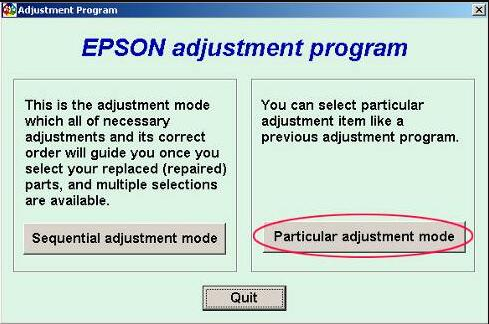
The Epson L1300 Adjustment Program is a reset utility used to clear the waste ink pad counter, fix Service Required errors, and restore Epson L1300 printers that have stopped printing because of end-of-service-life warnings. If your Epson L1300 shows blinking lights, waste ink pad messages, or maintenance-related errors, this guide explains how the resetter tool works and how to use it safely.
Looking for other Epson reset tools? Visit our Epson Adjustment Program Master Guide to browse compatible Epson resetter utilities and adjustment programs.
Quick Answer
The Epson L1300 Adjustment Program (AdjProg.exe) is a service utility used to reset the waste ink pad counter and clear Service Required errors. Download the Epson L1300 resetter tool, run the utility, select Waste Ink Pad Counter, and initialize the counter to restore printer functionality.
What Is Epson L1300 Adjustment Program?
The Epson L1300 Adjustment Program is a maintenance utility used by technicians and advanced users to access service functions, reset waste ink counters, perform maintenance operations, and troubleshoot Epson L1300 printers.
When the printer reaches its waste ink limit, the system may stop printing and display Service Required messages. The adjustment program helps clear these warnings when the issue is counter-related.
Why Epson L1300 Shows Service Required
Every Epson printer performs automatic cleaning cycles. During those cycles, a small amount of ink is collected inside the waste ink pad system. Epson tracks this process using an internal protection counter.
When the counter reaches its predefined limit, the printer may display:
- Service Required
- Parts inside your printer are at the end of their service life
- Waste ink pad counter warning
- Blinking red lights
- Printer support required
Epson L1300 Adjustment Program Features
- Reset Waste Ink Pad Counter
- Clear Service Required Error
- EEPROM Initialization
- Initial Ink Charge
- Head Cleaning Functions
- Printer Diagnostic Support
- Maintenance Utility Access
- Printer Adjustment Functions
Download Epson L1300 Adjustment Program
Use the download section below to access the Epson L1300 Adjustment Program. Always verify compatibility before running any reset utility.
How to Reset Epson L1300 Printer
- Download the Epson L1300 Adjustment Program.
- Extract the ZIP file using WinRAR or 7-Zip.
- Open the extracted folder.
- Run AdjProg.exe as administrator.
- Select Epson L1300.
- Click Particular Adjustment Mode.
- Select Waste Ink Pad Counter.
- Click Check.
- Select Main Pad Counter.
- Click Initialization.
- Restart the printer.
Common Problems Fixed by Epson L1300 Resetter
- Service Required Error
- Waste Ink Pad Counter Warning
- Blinking Red Lights
- End of Service Life Message
- Printer Lockout Issues
- Maintenance Counter Errors
Do You Need to Replace the Waste Ink Pad?
Resetting the waste ink counter does not physically replace the waste ink pad. If the pad is saturated, you may need cleaning, replacement, or professional maintenance.
Related Epson Adjustment Programs
- Epson Adjustment Program Master Guide
- Epson L3110 Adjustment Program
- Epson L380 Adjustment Program
- Epson L550 Adjustment Program
- Epson L800 Adjustment Program
Frequently Asked Questions
What is Epson L1300 Adjustment Program?
The Epson L1300 Adjustment Program is a reset utility used to clear waste ink pad counter warnings and Service Required errors.
What is AdjProg.exe?
AdjProg.exe is the executable file used to run the Epson Adjustment Program.
Why is my Epson L1300 showing Service Required?
The printer’s waste ink pad counter has likely reached its limit.
Can Epson L1300 Adjustment Program fix blinking lights?
Yes, if the blinking lights are caused by waste ink counter or maintenance warnings.
Does the reset utility replace the waste ink pad?
No. It resets the counter only. Physical maintenance may still be required.
Does Epson L1300 Adjustment Program work on Windows 11?
Compatibility depends on the software version and system configuration.
Conclusion
The Epson L1300 Adjustment Program is one of the most commonly used tools for resetting waste ink pad counters and fixing Service Required errors on Epson L1300 printers. Always use the correct utility version and follow the recommended maintenance procedures for long-term printer reliability.