The Epson L3151 is one of the most popular EcoTank models, but eventually many users face the “Service Required” message! Epson L3151 Service Required Fix. The printer stops working, lights begin blinking, and nothing prints. The good news is that this issue is not a hardware failure. It’s simply a maintenance stop triggered by the printer’s waste ink counter — and you can fix it at home within minutes.
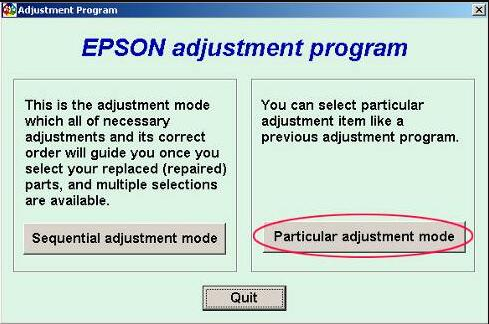
In this guide, you’ll learn the full Epson L3151 Service Required Fix, including the official-style reset process, why the error happens, and the download link for the Epson L3151 Adjustment Program.
Why the Epson L3151 Shows “Service Required”
Inside every Epson EcoTank printer is a small internal counter that keeps track of how much waste ink has been collected over time.
When you print, clean the nozzle, or run maintenance, extra ink is absorbed by special waste ink pads. Once the counter hits its limit, the printer shuts down as a safety precaution and shows:
- “Service required”
- “Parts inside your printer are nearing end of service life”
- Blinking red and power lights
This protection system prevents ink overflow and internal damage.
Luckily, resetting the counter restores full functionality.
Download the Epson L3151 Adjustment Program (Reset Utility)
Click below to download the reset tool needed to fix the waste ink counter:
🔽 Download Epson L3151 Adjustment Program
This tool supports: L3150, L3151, L3152, L3156, L3110, L3115, L3116, L3070 and other related models.
How to Apply the Epson L3151 Service Required Fix
Follow these simple steps:
1. Disable Antivirus (Important)
Reset tools sometimes trigger false virus warnings.
2. Extract the ZIP File
Right-click → Extract.
3. Run the Program as Administrator
Open AdjProg.exe.
4. Select Epson L3151 Model
Choose your printer and confirm.
5. Open “Waste Ink Pad Counter”
Then click:
- “Check”
- “Initialize”
- “Finish”
6. Restart Your Printer
Turn off → wait 10 seconds → turn back on.
Once the printer restarts, the Epson L3151 Service Required Fix is complete, and your printer should work normally again.
Do the Waste Ink Pads Need Replacement?
Not always. Most users hit the counter limit before the pads are physically full. The reset tool simply clears the internal limit.
However, if you notice ink leakage or have been using the printer heavily for years, consider installing an external waste ink tank or cleaning the pads for long-term safety.
Other Epson Adjustment Program Downloads
If you need tools for other models:
⭐ FAQ – Epson L3151 Service Required Fix
1. Why does my Epson L3151 show “Service Required”?
Because the internal waste ink counter reached its limit. Resetting it solves the problem.
2. Is the adjustment program safe to use?
Yes. It only resets the printer’s maintenance counter and does not affect print quality.
3. Do I need to replace the ink pads?
Not for most users. Resetting the counter is enough unless pads are physically overflowing.
4. Can I use this method on L3150 or L3152?
Yes. The same tool works with multiple L31xx models.