If your Epson Stylus SX620FW displays a “Service Required”, “A printer’s ink pad is at the end of its service life”, or “Waste Ink Pad Counter Overflow” error, don’t worry. This issue is common and can usually be fixed by resetting the printer’s waste ink pad counter using the Epson Stylus SX620FW Adjustment Program.
On this page, you’ll find the latest Epson SX620FW resetter download, a complete reset guide, troubleshooting tips, FAQs, and related Epson reset utilities.
Epson Stylus SX620FW Resetter Download
- Printer Model: Epson Stylus SX620FW
- Software: Epson Adjustment Program
- Latest Version: 2026
- License: Free Download
- Compatibility: Windows 11, Windows 10, Windows 8.1, Windows 8, Windows 7 (32-bit & 64-bit)
- Connection: USB Recommended
Download Epson SX620FW Resetter
Zip File Password :thanks
What Causes the Service Required Error?
Your Epson Stylus SX620FW automatically counts the amount of ink sent to the waste ink pad during maintenance operations such as print head cleaning, nozzle checks, and borderless printing.
Once the internal waste ink pad counter reaches Epson’s safety limit, the printer stops working and displays a service warning to prevent possible ink leakage.
Common Error Messages
- Service Required
- Waste Ink Pad Counter Overflow
- A printer’s ink pad is at the end of its service life
- Parts inside your printer are at the end of their service life
- Printer Error
- General Error
Symptoms of a Full Waste Ink Pad Counter
- Printer refuses to print
- Red error light flashing
- Service Required message appears
- Printer pauses all print jobs
- Epson Status Monitor shows maintenance error
- Printer is detected but unavailable
How to Reset Epson Stylus SX620FW
- Download the Epson SX620FW Adjustment Program.
- Extract the ZIP file.
- Connect the printer using a USB cable.
- Run AdjProg.exe as Administrator.
- Select Epson Stylus SX620FW.
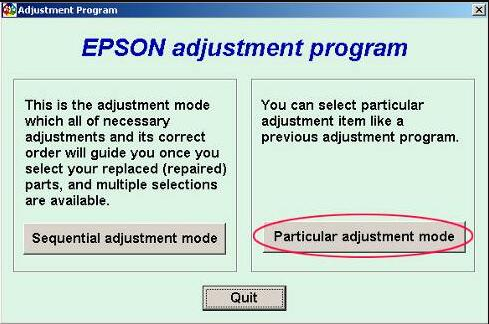
- Open Particular Adjustment Mode.
- Select Waste Ink Pad Counter.
- Click Check.
- Select Main Pad Counter.
- Click Initialization.
- Turn the printer OFF.
- Turn it ON again.
- Print a test page.
Important Tips Before Resetting
- Run the reset utility as Administrator.
- Temporarily disable antivirus if it blocks the software.
- Close Epson Status Monitor.
- Use a direct USB connection instead of Wi-Fi.
- Do not disconnect the printer while the reset process is running.
Should You Replace the Waste Ink Pad?
Resetting the counter removes the software restriction only. If your Epson SX620FW has been used extensively, cleaning or replacing the physical waste ink pad is recommended to avoid future ink leakage.
Supported Operating Systems
- Windows 11
- Windows 10
- Windows 8.1
- Windows 8
- Windows 7
- 32-bit & 64-bit Windows
Frequently Asked Questions
Is the Epson SX620FW resetter free?
Yes. You can download the latest Epson SX620FW Adjustment Program from this page.
Does the resetter remove printer settings?
No. It only resets the waste ink pad counter.
Can I reset using Wi-Fi?
USB connection is recommended for a successful reset.
Is Windows 11 supported?
Yes. The latest version fully supports Windows 11.
Why does the Service Required error return?
This usually happens if the waste ink pads are physically full or the reset process was incomplete.
Related Epson Resetter Downloads
- Epson Stylus SX525WD Resetter
- Epson Stylus SX535WD Resetter
- Epson Stylus SX515W Resetter
- Epson Stylus SX445W Resetter
- Why Need Reset Epson Printer
- Waste Ink Pad Counter Overflow Error
- How to Use Epson Adjustment Program
Popular Search Terms
Epson Stylus SX620FW resetter, Epson SX620FW Adjustment Program, Epson SX620FW Service Required Fix, Epson SX620FW Waste Ink Pad Reset, Epson SX620FW Adjustment Program Download, Epson SX620FW Printer Reset Tool, Epson SX620FW Ink Pad Counter Reset, Epson SX620FW Free Download, Epson Stylus SX620FW Reset Utility, Epson Printer Resetter.
Conclusion
The Epson Stylus SX620FW Resetter Adjustment Program is the fastest solution for fixing waste ink pad counter errors, Service Required messages, and maintenance lock issues. Download the latest reset utility, carefully follow the reset instructions above, and your Epson Stylus SX620FW should be back to normal in just a few minutes.
Need reset tools for other Epson printers? Browse our growing collection of Epson Adjustment Programs and troubleshooting guides on SupportPrinter24.