Is your Epson L110 showing the “Service Required”, “A printer’s ink pad is at the end of its service life”, or “Waste Ink Pad Counter Overflow” error?This error occurs when the printer’s internal waste ink pad counter reaches its maximum limit. Fortunately, you can fix the problem using the Epson L110 Adjustment Program (Resetter). This guide provides the latest reset utility, installation steps, troubleshooting tips, and answers to common questions.
Epson L110 Resetter Download
- Printer Model: Epson L110
- Software: Epson Adjustment Program
- Version: Latest 2026
- License: Free Download
- Operating System: Windows 11, Windows 10, Windows 8.1, Windows 8, Windows 7 (32-bit & 64-bit)
- Connection: USB Cable Recommended
Why Does Epson L110 Show the Service Required Error?
The Epson L110 automatically tracks the amount of waste ink produced during print head cleaning, nozzle checks, ink charging, and maintenance cycles. Once the estimated waste ink pad counter reaches Epson’s preset limit, the printer locks itself to prevent possible ink overflow.
This is a maintenance protection feature and does not necessarily mean your printer is damaged.
Common Error Messages
- Service Required
- A printer’s ink pad is at the end of its service life
- Waste Ink Pad Counter Overflow
- Parts inside your printer are at the end of their service life
- Printer Error
- General Error
Symptoms of a Full Waste Ink Pad Counter
- The printer refuses to print.
- Power light and error light flash continuously.
- Print jobs remain in the queue.
- Epson Status Monitor displays a service warning.
- The printer is detected but cannot print.
- Printing stops unexpectedly.
How to Reset Epson L110 Waste Ink Pad Counter
- Download the Epson L110 Adjustment Program.
- Extract the ZIP file.
- Connect the printer using a USB cable.
- Run AdjProg.exe as Administrator.
- Select Epson L110.
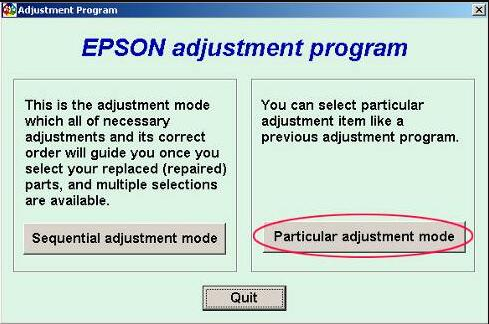
- Open Particular Adjustment Mode.
- Choose Waste Ink Pad Counter.
- Click Check.
- Select Main Pad Counter.
- Click Initialization.
- Turn the printer OFF.
- Turn it ON again.
- Print a test page to verify the reset.
Important Tips Before Resetting
- Use a direct USB connection.
- Run the software as Administrator.
- Temporarily disable antivirus if necessary.
- Close Epson Status Monitor before starting.
- Do not disconnect the printer during the reset process.
Should You Replace the Waste Ink Pad?
Resetting clears the waste ink counter stored in the printer’s memory. If your Epson L110 has been used extensively, replacing or cleaning the physical waste ink pad is recommended to prevent ink leakage and ensure long-term reliability.
Supported Windows Versions
- Windows 11
- Windows 10
- Windows 8.1
- Windows 8
- Windows 7
- 32-bit & 64-bit
Frequently Asked Questions (FAQ)
Is the Epson L110 resetter free?
Yes. The Epson L110 Adjustment Program is available for free download from this page.
Does resetting erase my printer settings?
No. The reset process only clears the waste ink pad counter and does not affect printer settings or installed drivers.
Can I reset the printer using Wi-Fi?
No. A direct USB connection is strongly recommended for successful communication with the reset utility.
Does the resetter work on Windows 11?
Yes. The latest Epson L110 resetter supports Windows 11 as well as earlier Windows versions.
Why does the Service Required message appear again?
If the physical waste ink pad is saturated or the initialization process was incomplete, the warning may reappear. Cleaning or replacing the waste ink pad is recommended for heavily used printers.
Related Epson Resetter Downloads
- Epson L120 Resetter
- Epson L220 Resetter
- Epson L310 Resetter
- Epson L360 Resetter
- Epson L365 Resetter
- Why Need Reset Epson Printer
- Waste Ink Pad Counter Overflow Error
- How to Use Epson Adjustment Program
Popular Search Terms
Epson L110 resetter, Epson L110 Adjustment Program, Epson L110 service required fix, Epson L110 waste ink pad reset, Epson L110 printer reset tool, Epson L110 Adjustment Program free download, Epson L110 ink pad counter reset, Epson L110 maintenance error, Epson L110 reset utility, Epson printer reset software.
Conclusion
The Epson L110 Resetter Adjustment Program is the easiest way to fix waste ink pad counter overflow and Service Required errors. Simply download the latest adjustment program, follow the reset instructions above, and restore your Epson L110 to normal operation within minutes.
Explore more Epson resetters, maintenance guides, and troubleshooting tutorials on SupportPrinter24 to keep your printer running smoothly.