Published: July 25, 2019 | Last Updated: March 31, 2026
If your Epson L3150 printer stops printing, shows a Service Required message, or starts flashing red indicator lights, the issue is often related to the waste ink pad counter. This is a common problem on Epson EcoTank printers after repeated cleaning cycles, regular printing, or long-term use.
That is why many users search for the Epson L3150 Adjustment Program. This model-specific maintenance utility is commonly used to reset the printer’s internal waste ink counter after it reaches its service limit. In many cases, resetting the counter can help restore normal printer access. However, before using any reset utility, it is important to understand why the warning appears and why a reset should be done carefully.
In this guide, you will learn what the Epson L3150 Adjustment Program does, why the printer shows the Service Required warning, how the reset process usually works, what issues can happen during reset, and how to reduce the chance of the same problem happening again.
What Is the Epson L3150 Adjustment Program?
The Epson L3150 Adjustment Program is a maintenance tool commonly used to reset the printer’s internal waste ink pad counter. Epson printers track the amount of waste ink produced during printhead cleaning and other maintenance cycles. When that internal counter reaches its preset limit, the printer may stop working until the issue is serviced and the counter is reset.
Users often search for the same tool using different names, such as:
- Epson L3150 reset tool
- Epson L3150 resetter
- Epson L3150 waste ink pad reset utility
- Epson L3150 service required reset program
- Epson L3150 waste ink counter reset tool

Although the wording may vary, the main purpose is usually the same: to reset the printer’s maintenance counter after it reaches the service threshold.
Why Epson L3150 Shows the Service Required Error
The Epson L3150 does not show the Service Required warning randomly. During nozzle cleaning, head cleaning, and other maintenance tasks, a small amount of extra ink is pushed into the printer’s internal waste ink system. Over time, the printer estimates how much ink has been sent there.
Once the internal protection counter reaches its limit, the printer may display warnings such as:
- Service Required
- Parts inside your printer are at the end of their service life
- Flashing red indicator lights
- Print jobs getting stuck
- Printer refusing to respond normally
This warning is a protective feature. It is designed to reduce the risk of internal ink overflow and help prevent damage caused by excess waste ink.
What the Waste Ink Pad Counter Actually Does
Inside the Epson L3150, there are absorbent pads that collect unused ink during maintenance cycles. Because the printer cannot constantly measure the exact physical condition of those pads, it relies on an estimated digital counter.
That counter helps reduce the risk of:
- Internal ink leakage
- Overflow inside the printer
- Stains on internal plastic parts
- Damage to sensitive electronic components
- Long-term reliability problems
When the counter reaches its limit, the printer may stop printing until the maintenance issue is handled and the counter is reset.
When You May Need the Epson L3150 Adjustment Program
You may need the Epson L3150 Adjustment Program when:
- The printer displays a Service Required warning
- The waste ink pad counter has reached its limit
- The red lights continue blinking
- The printer refuses to print even though paper and ink are fine
- Epson Status Monitor shows a maintenance-related warning
- The printer appears connected but remains locked
In these situations, many users look for an Epson L3150 reset solution to clear the waste ink protection message and restore normal printing.
Is Resetting the Counter Enough?
Not always.
This is where many users make a mistake. They reset the counter, the warning disappears, and they assume the problem is fully solved. But if the waste ink pads are already heavily saturated, resetting the printer without checking the actual maintenance condition may only provide a temporary fix.
If the waste ink system is not properly addressed, the printer may still face:
- Internal ink overflow
- Leakage from the base area
- Dirty internal components
- Repeat service warnings
- Damage to electronic parts in severe cases
So while the Epson L3150 Adjustment Program can be useful, it should be used responsibly and with a clear understanding of the real issue.
Common Symptoms of a Waste Ink Pad Counter Warning
Most Epson L3150 users notice one or more of these signs before searching for a reset tool:
- The printer suddenly stops accepting print jobs
- A Service Required popup appears
- Red indicator lights keep flashing
- The printer stays idle even when connected
- The print queue remains stuck
- Epson software reports a maintenance-related issue
When these symptoms appear together, the waste ink counter is often the first thing users check.
General Epson L3150 Reset Process
The exact screens and options may vary depending on the maintenance utility version, but the general Epson L3150 reset process usually looks like this:
1. Confirm the Printer Model
Always make sure the utility is specifically meant for Epson L3150. Using the wrong version may cause printer detection problems or incomplete reset results.
2. Connect the Printer with a Stable USB Cable
A direct USB connection is usually the safest method during maintenance-related operations. Avoid unstable hubs, loose cables, or interrupted connections.
3. Close Other Printer Software
Before running the adjustment program, close print queue windows, Epson monitoring software, and other background tools that may interfere with printer communication.
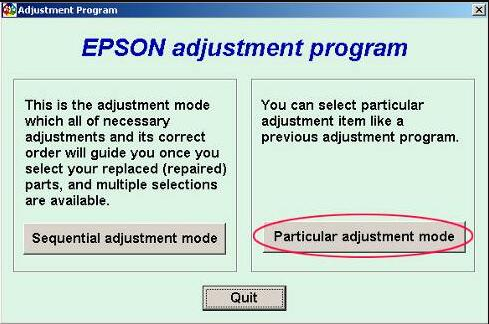
4. Open the Adjustment Program
Launch the maintenance utility and select the correct Epson printer model if the software asks for it.
5. Access the Waste Ink Pad Counter Option
Most reset tools include a menu related to the protection counter, maintenance counter, or waste ink pad counter.
6. Check the Current Counter Status
Some versions display the current service level or counter percentage before reset.
7. Perform the Counter Reset
After confirming the correct model and maintenance section, the reset function is usually applied from within the waste ink counter menu.
8. Restart the Printer
Turn the printer off and on again after the reset so the new counter state can be recognized properly.
9. Run a Test Print
After restart, perform a simple print test or nozzle check to confirm that the warning is gone and the printer responds normally.
Problems That Can Happen During Reset
Not every reset attempt works perfectly. Some users face issues during the Epson L3150 adjustment process.
Printer Not Detected
This may happen because of:
- Wrong model selection
- Unstable USB connection
- Driver communication problems
- Background software conflicts
- Incompatible tool version
Reset Stops or Fails
Possible causes include:
- Unsupported reset utility
- Damaged or incomplete reset package
- Interrupted printer connection
- System restrictions
- Software conflicts
Warning Returns Soon After Reset
This usually means:
- The waste ink condition was not properly addressed
- The reset did not apply fully
- The printer has another maintenance-related issue
- The wrong utility was used
Printer Still Does Not Print
Even after a successful counter reset, the printer may still fail to print because of:
- Driver issues
- Pending queue problems
- Printhead-related faults
- Firmware behavior
- Another hardware problem unrelated to the waste ink counter
Why Random Reset Tools Can Be Risky
Many websites offer free reset utilities, but not every tool is trustworthy. Some files may be outdated, incompatible, or unsafe to use.
Possible risks include:
- Malware or bundled unwanted software
- Incorrect model support
- Fake reset confirmation
- Unstable printer communication
- Incomplete counter reset
- Repeat problems after temporary fixes
That is why it is important to use care when choosing any Epson L3150 reset utility and to avoid random downloads from unreliable sources.
Safer Steps Before Using Any Epson L3150 Adjustment Program
Before using any reset utility, it is smart to go through a few basic checks:
- Confirm the printer is really Epson L3150
- Make sure the error is related to the waste ink system
- Check for visible signs of internal leakage
- Avoid using tools meant for another Epson model
- Close unnecessary printer-related software
- Keep the printer connection stable during the process
The biggest mistake is rushing into a reset without understanding the real reason behind the warning.
How to Reduce the Chance of This Error in the Future
You may not be able to avoid the issue forever, especially if you print regularly, but you can reduce how often it appears.
Helpful habits include:
- Avoid unnecessary printhead cleaning cycles
- Use the printer regularly instead of leaving it unused for long periods
- Use proper ink and follow good maintenance practices
- Avoid repeated power cycling without reason
- Keep the printer clean and in a stable environment
- Pay attention to early warning signs before the issue becomes serious
Heavy-use printers will usually reach the waste ink threshold sooner than lightly used devices.
Should You Use the Epson L3150 Adjustment Program?
Yes, but only when you understand what it actually does.
The Epson L3150 Adjustment Program can be a practical solution when the printer stops because the waste ink pad counter has reached its service limit. In many cases, resetting the counter can help restore normal printing. But the best results come when the reset is treated as part of proper maintenance, not just as a shortcut to remove the warning.
A smarter approach is to:
- Confirm the warning is really waste ink counter related
- Use the correct Epson L3150-specific reset method
- Check the printer’s maintenance condition
- Restart and test the printer after reset
- Monitor whether the warning returns again
That way, you are not just hiding the message. You are handling the issue more responsibly.
Frequently Asked Questions
Why is my Epson L3150 saying Service Required?
In most cases, the printer shows this warning because the waste ink pad counter has reached its protection limit after repeated maintenance cycles and long-term use.
What does the Epson L3150 Adjustment Program do?
It is commonly used to reset the internal waste ink counter or maintenance counter so the printer can operate again after reaching the service threshold.
Can I reset the Epson L3150 without checking the pads?
You can reset the counter, but doing so without understanding the actual waste ink condition may only provide a temporary fix and could increase the risk of overflow later.
Why is my Epson L3150 not detected by the reset tool?
This can happen because of incorrect model selection, unstable USB connection, driver issues, software conflicts, or an incompatible utility version.
Is the waste ink pad counter warning a hardware failure?
Not necessarily. In many cases, it is a maintenance protection warning rather than a direct hardware breakdown.
Will the Service Required warning come back after reset?
Yes, it can return if the reset was incomplete, the wrong tool was used, or the real waste ink maintenance condition was not properly addressed.
Can the Epson L3150 Adjustment Program fix every printer problem?
No. It is mainly related to resetting the waste ink pad counter. It will not solve unrelated issues such as driver errors, printhead faults, or other hardware problems.
Final Thoughts
The Epson L3150 Adjustment Program is one of the most searched solutions when this printer stops with a waste ink pad counter warning or a Service Required error. The problem is common, frustrating, and often manageable when handled correctly.
But the best approach is not simply to reset the message and move on. A better solution is to understand why the warning appeared, use the correct model-specific reset method, and remember that the waste ink system itself still matters.
If your goal is to restore the Epson L3150 safely and avoid repeat problems, focus on both the counter reset and the real maintenance condition behind the warning.