Epson L850 Adjustment Program is the tool many users search for when the printer suddenly stops, shows a service message, or refuses to print even though it still powers on normally. In many cases, the printer is not fully damaged. It has reached an internal maintenance limit, and that is where the adjustment utility becomes important.
The Epson L850 is a photo-focused all-in-one EcoTank printer with features such as an LCD screen, PC-free photo printing from memory cards and cameras, and refillable ink tanks. Because it is built as a long-term, high-value printer, many owners prefer resetting and maintaining it instead of replacing it when a waste ink counter issue appears. :contentReference[oaicite:1]{index=1}
This guide explains the Epson L850 adjustment program in a practical way. It covers what the tool does, when to use it, how to download it safely, how to run the reset process, and what problems it cannot solve. The goal is simple: give users a useful, honest article instead of a generic page full of empty promises.
Why Epson L850 Adjustment Program Matters
Most users look for this utility only after the printer starts showing warning behavior. Common situations include a waste ink pad service warning, a blocked printing state, or a maintenance message that appears even though the printer still looks physically normal. Third-party reset utility references for the L850 specifically list waste ink counter reading and resetting among the supported functions.
That is why the Epson L850 adjustment program is not just another download. It is a maintenance tool that can restore printer operation when the problem is related to internal service values rather than major hardware failure.
What Is Epson L850 Adjustment Program?
The Epson L850 adjustment program is a service utility used to access internal printer functions that are not available through the normal driver. For this model, the most common reason to use it is resetting the waste ink pad counter after the printer reaches its protection limit.
Some adjustment-program references for the L850 also list additional service features such as EEPROM-related settings, initial ink charge, head ID input, USB ID input, printhead cleaning, and alignment-related adjustments. The exact menu options depend on the specific tool build, so a good download page should describe them carefully instead of implying that every version includes every function.
A Few Epson L850 Details That Make This Model Different
A strong article should not sound as if it was written for every Epson printer at once. The L850 has its own profile, and that matters when explaining reset software.
It is a photo-centric all-in-one
The L850 is not just a basic office printer. Epson markets it as an EcoTank all-in-one designed for low-cost printing and PC-less photo use through its LCD screen and card/camera support.
It belongs to the L850 series with official setup and support resources
Epson has official setup and support pages for the L850 series, which helps confirm that model-specific drivers, guides, and documentation exist.
It has broader maintenance needs than a simple home printer
Because the L850 is often used for frequent photo printing, users may run multiple cleaning cycles and heavy workloads over time. That makes waste ink management and counter resets more relevant than on a lightly used printer.
Epson L850 Adjustment Program vs Normal Driver
This confusion causes many failed fixes, so it should be explained clearly.
Normal Driver
The printer driver helps the operating system send print jobs correctly. If the driver is missing or corrupted, printing may fail for ordinary software reasons.
Adjustment Program
The adjustment program is a maintenance utility. It communicates with protected service functions, including waste ink counter operations and other internal service controls depending on the build.
If the Epson L850 is blocked because its waste ink counter has reached the limit, reinstalling the standard driver usually does not solve the real problem.
Important Warning Before Resetting
A trustworthy page should always include this point. Resetting the waste ink counter is not the same thing as replacing or servicing the physical waste ink absorber system inside the printer. Epson’s own ink-pad reset terms state that the reset software is intended to be used only after the ink pads are replaced.
That means the Epson L850 adjustment program can clear the software-side lock, but it should not be described as a full mechanical repair. If the printer has been heavily used for years, physical maintenance may still be necessary.
How to Download Epson L850 Adjustment Program Safely
Users often rush this stage and download the wrong package. A better support article helps them avoid that mistake.
Check that the file clearly supports Epson L850
Some utility pages list exact model support for the L850, while others bundle it with related models such as L810. Compatibility should be stated clearly before the user runs anything.
Extract the archive fully
If the file comes in ZIP or RAR format, extract it into a normal folder before launching the program. Running service tools directly from inside an archive often causes errors.
Use the correct computer environment
Many classic Epson service tools are Windows-focused. Some older adjustment-program listings for L810/L850 also suggest legacy support assumptions, so users on modern systems may occasionally need administrator rights or compatibility mode.
Scan the file before running it
A technical support page should encourage careful verification instead of telling users to ignore every security warning automatically.
Step-by-Step Guide to Use Epson L850 Adjustment Program
Below is a clean workflow that suits most users.
Step 1: Power On the Printer
Turn on the Epson L850 and wait until it completes startup. If the LCD or status lights show an error, note it first.
Step 2: Connect the Printer by USB
Even if the printer has multiple ways to work with media and devices, a direct USB connection is usually the safest option for maintenance software communication.
Step 3: Close Background Printer Software
Exit Epson monitoring tools, print queue windows, and other software that may already be using the printer connection.
Step 4: Run the Program as Administrator
Open the Epson L850 adjustment program with administrator rights so it can access the device properly.
Step 5: Select the Correct Model
Inside the utility, choose Epson L850 from the model list. If the tool groups the L850 with another model such as L810, confirm that your exact model is supported.
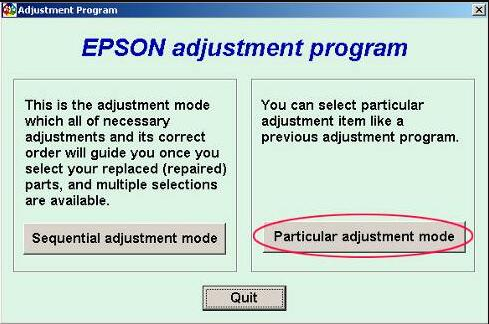
Step 6: Enter Maintenance or Particular Adjustment Mode
Different builds use different names, but this is where internal service functions are usually located.
Step 7: Open the Waste Ink Counter Section
Look for names such as Waste Ink Pad Counter, Main Pad Counter, Protection Counter, or Initialization. Utility pages for the L850 and Epson service tools commonly describe these types of maintenance actions.
Step 8: Read the Counter Value
If the tool allows it, check the current waste ink counter value first. This confirms that the utility is communicating correctly with the printer.
Step 9: Reset the Counter
Run the reset option and follow the prompts. Some utilities use a key-based reset flow, while classic adjustment programs perform the reset directly through service menus. WIC references for the L850 describe a check-and-reset process using the utility and a reset key.
Step 10: Restart and Test Print
After the reset, restart the printer if required and print a small test page to confirm whether the service lock has cleared.
What Epson L850 Adjustment Program Can Help With
Waste ink counter lock
Maintenance-related printer stop conditions
Reading waste ink counter values
Certain service and adjustment tasks depending on the exact tool build
Third-party support pages for this model specifically mention waste ink counter reset, reading waste counters, and some additional service-related functions.
What It Cannot Reliably Fix
Broken paper feed mechanism
Electrical printhead damage
Serious carriage obstruction
Mainboard or power supply faults
Physical ink leakage caused by neglected absorber maintenance
This is an important trust point. A reset tool is useful, but it is not a miracle repair for every possible printer problem.
Troubleshooting Epson L850 Adjustment Program Problems
The program does not open
Extract the archive again, then run the utility as administrator. If the tool is older, compatibility mode may help on newer Windows systems.
The printer is not detected
Try another USB port, avoid hubs, restart both the computer and the printer, and close other programs that might be using the printer connection.
The reset finishes but the error remains
This usually means the wrong model was selected, the communication failed during reset, or the problem is not actually related to the waste ink counter.
The printer works again but print quality is poor
The adjustment program does not automatically solve nozzle clogs unless the particular build includes and uses maintenance options for that purpose. Run a nozzle check and avoid repeated cleaning unless it is truly needed.
Best Practices After Resetting Epson L850
Once the Epson L850 adjustment program has done its job, a few good habits help the printer last longer:
Avoid unnecessary cleaning cycles
Use the printer regularly to reduce clogging
Keep track of when the reset was done
Watch for signs of actual waste ink overflow
Do not repeat resets endlessly without checking physical maintenance needs
FAQ: Epson L850 Adjustment Program
Is Epson L850 Adjustment Program the same as a resetter?
In most cases, yes. Users often use “adjustment program,” “resetter,” and “service utility” to describe the same type of maintenance software.
Can it reset the Epson L850 waste ink counter?
Yes. Third-party L850 utility pages specifically list reading and resetting waste ink counters as supported functions.
Does Epson have official support pages for the L850?
Yes. Epson has official support and setup pages for the L850 series.
Is the L850 a normal office printer?
Not exactly. Epson markets it as an EcoTank all-in-one with PC-less photo printing features, LCD operation, and refillable tanks, which makes it popular with photo-heavy users.
Does resetting mean the printer is fully repaired?
No. Epson’s own ink-pad reset terms say the reset software is intended for use only after replacing the ink pads.
Can the utility fix every Epson L850 problem?
No. It mainly helps with maintenance-counter-related lock conditions, not every hardware or mechanical issue.
Conclusion
Epson L850 Adjustment Program is an important tool for users dealing with waste ink counter locks and service-related printing stops. Because the L850 is a long-term EcoTank all-in-one designed for low-cost, photo-friendly use, many owners prefer to maintain and reset it instead of replacing it at the first major warning.
The best support page is not the one that makes the biggest claims. It is the one that explains the tool honestly, shows how to use it safely, and makes it clear that a counter reset does not replace physical maintenance. That kind of content is better for users, better for trust, and better for long-term SEO.