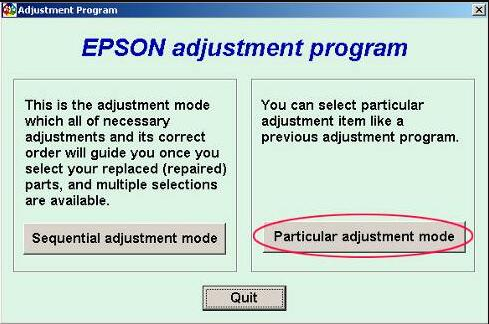
Epson Stylus SX435W Adjustment Program (Reset Utility)
Epson Stylus SX435W Adjustment Program is a reset utility used to fix Service Required errors, waste ink pad counter overflow warnings, blinking light problems, and end-of-service-life messages on Epson Stylus SX435W printers.
If your Epson Stylus SX435W printer stops printing and shows maintenance-related warnings, this adjustment program can help restore printer functionality by resetting the internal waste ink pad counter.
Learn more about Why Need Reset Epson Printer and How to Reset Epson Printer.
Why Need Epson Stylus SX435W Adjustment Program?
Epson printers use an internal maintenance protection system that counts waste ink generated during print head cleaning and service cycles. When the printer reaches its preset limit, it may stop printing and show warning messages.
- Service Required
- Parts inside your printer are at the end of their service life
- Waste ink pad counter overflow
- Printer requires maintenance
- Blinking red lights
Download Epson Stylus SX435W Adjustment Program
Download the Epson Stylus SX435W Resetter Tool using the button below. Extract the file and follow the reset instructions carefully.
Password: thanks
Features of Epson Stylus SX435W Resetter Tool
- Reset Waste Ink Pad Counter
- Fix Service Required Error
- Remove Blinking Light Warning
- Restore Printer Functionality
- Maintenance Counter Reset
- EEPROM Functions
- Printer Diagnostic Options
Supported Operating Systems
- Windows 11
- Windows 10
- Windows 8 / 8.1
- Windows 7
- Windows Vista
- Windows XP
How to Reset Epson Stylus SX435W Printer
- Download the Epson Stylus SX435W Adjustment Program.
- Extract the ZIP or RAR file.
- Open the extracted folder.
- Run AdjProg.exe as Administrator.
- Select the Epson Stylus SX435W printer model.
- Click Particular Adjustment Mode.
- Select Waste Ink Pad Counter.
- Click Check.
- Select the Main Pad Counter checkbox.
- Click Initialize.
- Turn off the printer.
- Restart the printer.
After restarting, the Service Required message should disappear and the printer should work normally again.
Important Notes Before Resetting
- Run the utility as Administrator.
- Use a direct USB connection.
- Temporarily disable antivirus if the tool does not open.
- Use only the correct resetter for Epson Stylus SX435W.
- Restart the printer after completing the reset.
Frequently Asked Questions
What is Epson Stylus SX435W Adjustment Program?
It is a reset utility used to clear waste ink pad counter warnings and Service Required errors on Epson Stylus SX435W printers.
Can Epson SX435W Resetter fix blinking lights?
Yes. If the blinking lights are caused by the waste ink counter reaching its limit, the reset utility can help clear the warning.
What is AdjProg.exe?
AdjProg.exe is the executable file used to run the Epson Adjustment Program.
Does resetting replace the waste ink pad?
No. Resetting only clears the software counter. Physical maintenance may still be needed if the pad is saturated.
Related Epson Adjustment Programs
- Epson Adjustment Program Master Guide
- How to Use Epson Adjustment Program
- Epson Stylus SX420W Adjustment Program
- Epson Stylus SX425W Adjustment Program
- Epson Stylus SX430 Adjustment Program
Search Terms
#Epson Stylus SX435W Adjustment Program
#Epson Stylus SX435W Resetter
#Epson Stylus SX435W Waste Ink Pad Counter Reset
#Epson Stylus SX435W Service Required Fix
Conclusion
The Epson Stylus SX435W Adjustment Program is useful for fixing Service Required errors, waste ink pad counter overflow warnings, and blinking light problems. Follow the reset steps carefully and always use the correct utility for your printer model.