Epson WorkForce 635 Adjustment Program is a free reset utility used to fix Service Required errors, waste ink pad counter overflow warnings, blinking light problems, and end-of-service-life messages on Epson WorkForce 635 printers.
This reset utility helps restore printer functionality by resetting the internal waste ink pad counter. If your Epson WorkForce 635 printer has stopped printing and displays maintenance-related warnings, the adjustment program can help solve the problem quickly.
Learn more about Why Need Reset Epson Printer and How to Reset Epson Printer.
Why Need Epson WorkForce 635 Adjustment Program?
Modern Epson printers use an internal maintenance protection system that monitors waste ink generated during print head cleaning and maintenance cycles. Once the printer reaches its predefined protection limit, it may display warning messages such as:
- Your printer requires service.
- Parts inside your printer are at the end of their service life.
- Waste ink pad counter overflow.
- Service Required.
- Printer requires maintenance.
- Blinking red light error.
When these warnings appear, the printer may stop printing until the maintenance counter is reset using the Epson WorkForce 635 Adjustment Program.
Download Epson WorkForce 635 Adjustment Program
Download the Epson WorkForce 635 Resetter Tool using the button below. Extract the files and follow the reset instructions to restore printer functionality.
Supported Error Messages
- Service Required
- Printer requires support
- Waste ink pad counter overflow
- Parts inside your printer are at the end of their service life
- Printer maintenance required
- Blinking red lights
- End of service life warning
Features of Epson WorkForce 635 Resetter Tool
- Reset Waste Ink Pad Counter
- Fix Service Required Errors
- Remove Blinking Light Warnings
- Restore Printer Functionality
- Maintenance Counter Reset
- EEPROM Functions
- Printer Maintenance Tools
- Diagnostic Functions
Supported Operating Systems
- Windows 11 (32-bit / 64-bit)
- Windows 10 (32-bit / 64-bit)
- Windows 8 / 8.1
- Windows 7
- Windows Vista
- Windows XP
How to Reset Epson WorkForce 635 Printer
- Download the Epson WorkForce 635 Adjustment Program.
- Extract the ZIP or RAR archive.
- Open the extracted folder.
- Run AdjProg.exe as Administrator.
- Click Select and choose Epson WorkForce 635.
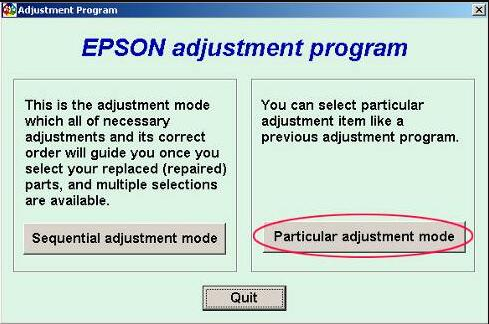
- Click Particular Adjustment Mode.
- Select Waste Ink Pad Counter.
- Click Check.
- Select Main Pad Counter.
- Click Initialize.
- Turn off the printer.
- Restart the printer.
After restarting, the Service Required warning should disappear and the printer should function normally again.
Important Notes Before Resetting
- Run the program as Administrator.
- Use a direct USB connection.
- Temporarily disable antivirus software if the utility does not open.
- Select the correct printer model before performing any reset.
- Restart the printer after completing the reset process.
Common Epson WorkForce 635 Problems
Printer Not Printing
This often occurs when the waste ink pad counter reaches its limit and the printer enters protection mode.
Blinking Red Lights
Continuous blinking lights usually indicate a maintenance counter overflow or Service Required condition.
Service Required Error
This warning appears when the printer determines that maintenance is required and the internal counter has reached its predefined limit.
Frequently Asked Questions
What is Epson WorkForce 635 Adjustment Program?
It is a maintenance utility used to reset waste ink pad counters and fix Service Required errors on Epson WorkForce 635 printers.
Can Epson WorkForce 635 Resetter fix blinking lights?
Yes. If the blinking lights are caused by the waste ink counter reaching its limit, the reset utility can help clear the error.
What is AdjProg.exe?
AdjProg.exe is the main executable file used to launch the Epson Adjustment Program.
Does resetting replace the waste ink pad?
No. Resetting only clears the software counter. Physical maintenance may still be required if the waste ink pad becomes saturated.
Is the Epson WorkForce 635 Adjustment Program free?
Availability depends on the version provided. Always download from trusted sources.
Related Epson Adjustment Programs
- Epson Adjustment Program Master Guide
- How to Use Epson Adjustment Program
- Why Need Reset Epson Printer
- Epson WorkForce 625 Adjustment Program
- Epson WorkForce 633 Adjustment Program
Search Terms
#Epson WorkForce 635 Adjustment Program
#Epson WorkForce 635 Resetter
#Epson WorkForce 635 Waste Ink Pad Counter Reset
#Epson WorkForce 635 Error Solution
#Epson WorkForce 635 Service Required Fix
Conclusion
The Epson WorkForce 635 Adjustment Program is a useful reset utility for fixing Service Required errors, waste ink pad counter overflow warnings, and blinking light problems. Follow the instructions carefully to restore printer functionality and continue printing normally.