Epson WorkForce 320 Adjustment Program: Service Lock Reset Help
Last checked: March 29, 2026
The Epson WorkForce 320 can stop responding in a way that feels confusing. The printer may still power on, the screen may still work, and yet printing does not continue. In many of those cases, the real issue is not sudden printer death. It is an internal service lock connected to the waste ink counting system. That is why people search for the Epson WorkForce 320 Adjustment Program.
This guide is built around a simple idea: first understand the lock, then decide whether the reset utility is the right move. That approach is safer than downloading tools blindly and hoping one of them fixes the printer.
Good to know: A waste ink counter reset can restore access to the printer, but it does not physically renew the parts inside the waste ink system.
The Problem Behind the Warning
The Epson WorkForce 320 handles extra ink during print head cleaning and internal maintenance. Instead of measuring the exact physical state of the ink pads, the printer keeps an internal estimate of how much waste ink activity has occurred. Once that estimate reaches its limit, the printer may block normal operation.
At that point, users often see behavior such as:
the printer turns on but printing does not continue
a maintenance or service message appears
the device becomes stuck after repeated cleaning routines
no clear paper jam is visible, but the machine still refuses to work
What the Adjustment Program Is Meant to Do
The Epson WorkForce 320 Adjustment Program is designed to access maintenance-level functions for this specific model. The most common reason to use it is to clear the internal waste ink counter when that counter has triggered a service lock.
In plain language, the utility helps the printer move past a counter-based stop condition. It is not a full repair suite for every fault the machine can have.
When This Utility Makes Sense
This tool makes sense when the Epson WorkForce 320 is locked by a protection counter and your symptoms match that kind of problem. It makes far less sense if your main issue is one of the following:
paper feeding trouble
scanner hardware problems
cartridge recognition failure
USB communication faults unrelated to the counter
print quality problems caused by clogging alone
Using the right reset tool for the wrong problem often wastes time and creates more confusion.
A Smarter Pre-Reset Checklist
Before opening the program, run through these checks:
confirm the model is exactly Epson WorkForce 320
use a direct cable connection instead of a hub
make sure the printer driver is properly installed
close other Epson tools and background utilities
check whether the printer symptoms really point to a maintenance lock
These small checks help reduce failed resets and false troubleshooting.
Reset Sequence for Epson WorkForce 320
If you are confident the issue is counter-related, the typical sequence looks like this:
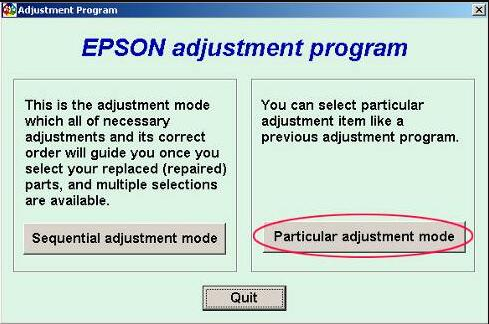
Launch the Epson WorkForce 320 adjustment utility.
Select the correct printer and communication port.
Enter the maintenance or adjustment menu.
Find the Waste Ink Pad Counter function.
Read the counter information if that option appears.
Run the reset or initialize command.
Power the printer off and on after the process finishes.
A successful reset may remove the lock and let the printer return to normal operation.
Three Common Outcomes After Running the Tool
The printer is detected and the reset works
This is the ideal result. The service lock disappears and the printer becomes usable again.
The program opens, but the reset does not complete
This often points to a wrong port, unstable connection, or a mismatch between the tool and the printer model.
The reset finishes, but the warning remains
This usually means one of three things: the wrong utility was used, the process did not complete correctly, or the printer needs attention beyond the software reset.
What to Try If the Reset Fails
If the utility does not solve the issue on the first attempt, try a cleaner troubleshooting path instead of repeating the same step blindly:
restart the computer and printer
change the USB cable or port
verify the selected printer port inside the utility
reinstall the Epson driver
confirm the reset program is specifically for WorkForce 320
What Users Often Misunderstand
One of the biggest misunderstandings is thinking that a successful counter reset means the printer has been fully serviced. That is not what the utility does. It clears a software-based threshold. It does not automatically deal with absorbed ink, long-term buildup, or other mechanical wear.
That difference matters because it changes what you should expect after the printer starts working again.
How Safe Is the Epson WorkForce 320 Adjustment Program?
Its safety depends less on hype and more on accuracy. The program is safest when:
the file matches the exact model
the source is reliable
the printer symptoms truly match a waste ink counter issue
the user understands the limits of the reset
Most bad experiences come from mismatch, poor files, or wrong diagnosis.
Aftercare: What to Watch Once Printing Returns
After the Epson WorkForce 320 begins printing again, pay attention to behavior rather than assuming the job is fully done. Good follow-up includes:
printing a small test document first
avoiding repeated heavy cleaning cycles
watching for the same warning returning too quickly
checking for unusual ink marks or leakage around the printer area
Final Word
The Epson WorkForce 320 Adjustment Program is useful when the printer is blocked by a waste ink counter lock and needs a maintenance reset to continue. If that is the real fault, the utility can be a practical solution. If that is not the real fault, the same tool may achieve nothing at all.
The best results come from matching the reset process to the actual problem. Diagnose first, reset second, and treat software recovery and real maintenance as two different things.
Fast Answers
What does the Epson WorkForce 320 Adjustment Program do?
It resets the internal waste ink counter when that counter has locked the printer.
Why is my WorkForce 320 powered on but not printing?
One possible reason is a service lock caused by the waste ink protection threshold.
Can this utility solve all printer problems?
No. It mainly helps with counter-based maintenance locks.
Why does the warning stay after reset?
The wrong utility may have been used, the process may not have completed, or the printer may need physical maintenance too.
Should I use a general Epson reset tool?
It is better to use a utility that specifically matches Epson WorkForce 320.