Skip to content

Epson Waste Ink Pad Counter Reset Guide (2026)

    What Is Epson Waste Ink Pad Counter?

    The Epson waste ink pad counter is an internal maintenance counter used by Epson printers to estimate how much waste ink has been collected during cleaning cycles, ink charging, and printhead maintenance. When this counter reaches its limit, the printer may stop working and display a warning such as Service Required or Ink Pad Is At The End Of Its Service Life.

    In many cases, this issue can be fixed by using the correct Epson Adjustment Program and resetting the waste ink pad counter safely.

    Why Does the Waste Ink Pad Counter Need Resetting?

    Epson printers collect excess ink during cleaning and maintenance cycles. The printer tracks this activity using an internal counter. Once the counter reaches its programmed limit, the printer may stop printing to prevent possible ink overflow.

    • Frequent printhead cleaning
    • Heavy printing volume
    • Long-term printer use
    • Repeated ink charging
    • Maintenance cycle buildup

    Common Warning Messages

    • Service Required
    • Printer’s Ink Pads Are At The End Of Their Service Life
    • Waste Ink Pad Counter Overflow
    • Parts Inside Your Printer Are At The End Of Their Service Life

    If you see a Service Required message, you may also read our guide on How to Fix Epson Service Required Error.

    How to Reset Epson Waste Ink Pad Counter

    1. Download the correct Epson Adjustment Program for your printer model.
    2. Extract the downloaded file if needed.
    3. Run AdjProg.exe as Administrator.
    4. Select your printer model and port.
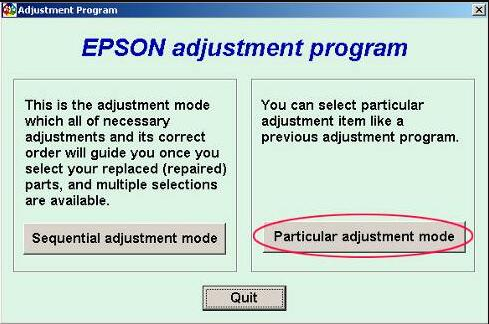
    5. Click Particular Adjustment Mode.
    6. Select Waste Ink Pad Counter.
    7. Click Check to read the current counter value.
    8. Select the counter checkbox.
    9. Click Initialize.
    10. Turn off the printer when prompted.
    11. Turn the printer back on and run a test print.

    For full download instructions, visit the Epson Adjustment Program Download Guide.

    Important Safety Note

    Resetting the counter does not physically clean or replace the waste ink pad. It only resets the internal counter value. If your printer has heavy ink leakage, strong ink smell, or repeated service warnings, physical maintenance may be required.

    Popular Epson Models

    FAQ

    Can I reset Epson waste ink pad counter myself?

    Yes, if you use the correct Epson Adjustment Program for your exact printer model.

    Does resetting the counter clean the waste ink pad?

    No. It only resets the internal counter. Physical cleaning or replacement may still be needed.

    Is Epson Adjustment Program required?

    For many Epson models, yes. The waste ink counter usually requires a model-specific reset utility.

    Why does the error return after reset?

    The error may return if the waste ink pad is physically saturated, the wrong reset tool was used, or the reset process was incomplete.

    Related Epson Guides

    Conclusion

    The Epson waste ink pad counter reset is useful when your printer displays Service Required or ink pad end-of-life warnings. However, always use the correct reset tool for your exact model and remember that a counter reset is not the same as physically cleaning or replacing the waste ink pad.