What Is AdjProg.exe?
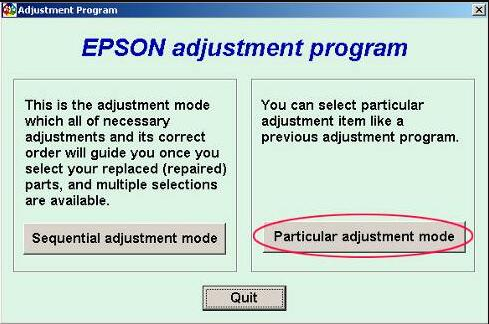
AdjProg.exe is the main executable file used to launch the Epson Adjustment Program. This utility is commonly used for Epson printer maintenance tasks, including waste ink pad counter reset, printer initialization, and service-related diagnostics.
Many users search for AdjProg.exe download when their Epson printer displays warnings such as Service Required, Parts Inside Your Printer Are At The End Of Their Service Life, or Waste Ink Pad Counter Overflow. In many cases, the correct Epson Adjustment Program can help restore normal printer operation.
What Does AdjProg.exe Do?
AdjProg.exe works as the launcher for Epson maintenance software. Depending on the printer model and software version, it may provide access to several service functions.
- Waste Ink Pad Counter Reset
- Printer Initialization
- EEPROM Information
- Head Cleaning Functions
- Ink Charge Procedures
- Maintenance Settings
- Service Diagnostics
Available features may vary by Epson model. That is why it is important to use the correct adjustment program for your exact printer.
Why Users Search for AdjProg.exe
Most users search for AdjProg.exe when their Epson printer stops printing because of a maintenance-related warning. These warnings are usually connected to the waste ink counter or internal service limits.
Common reasons include:
- Epson Service Required error
- Waste ink pad counter warning
- Red light blinking problem
- Printer refusing to print
- End of service life message
- Maintenance counter overflow
If your printer shows a service warning, you may also read our guide on How to Fix Epson Service Required Error.
How to Use AdjProg.exe Safely
Before using AdjProg.exe, make sure you have downloaded the correct Epson Adjustment Program for your exact printer model. Using the wrong version may cause communication errors or fail to reset the printer properly.
- Download the correct Epson Adjustment Program for your printer model.
- Extract the downloaded file if it is compressed.
- Locate the AdjProg.exe file.
- Right-click and choose Run as Administrator.
- Select your printer model if required.
- Choose the correct USB or printer port.
- Click Particular Adjustment Mode.
- Select the required maintenance function.
- Follow the on-screen instructions carefully.
For model-specific downloads and instructions, visit the Epson Adjustment Program Download Center.
How to Reset Waste Ink Pad Counter Using AdjProg.exe
One of the most common uses of AdjProg.exe is resetting the Epson waste ink pad counter. This is usually needed when the printer displays a Service Required or ink pad end-of-life warning.
- Open AdjProg.exe as Administrator.
- Select the correct printer model and port.
- Open Particular Adjustment Mode.
- Choose Waste Ink Pad Counter.
- Click Check to read the current counter value.
- Select the available counter checkbox.
- Click Initialize.
- Turn off the printer when prompted.
- Turn the printer back on and run a test print.
For a complete explanation of waste ink counters, read our Epson Waste Ink Pad Counter Reset Guide.
Common AdjProg.exe Problems and Fixes
AdjProg.exe Won’t Open
If AdjProg.exe does not open, the issue may be related to permission, antivirus blocking, missing files, or Windows compatibility.
- Run the file as Administrator.
- Extract all files before launching.
- Check whether antivirus software is blocking the utility.
- Try Windows compatibility mode if needed.
Printer Not Detected
If the printer is not detected by AdjProg.exe, the problem is often related to the connection, driver, or selected port.
- Reconnect the USB cable.
- Restart both printer and computer.
- Install the correct Epson printer driver.
- Select the correct printer port.
- Avoid using unstable USB hubs.
Communication Error
A communication error usually means the software cannot properly connect with the printer.
- Try a different USB port.
- Disconnect other printers temporarily.
- Make sure the printer is powered on and ready.
- Use the adjustment program version made for your printer model.
Popular Epson Models Using AdjProg.exe
AdjProg.exe is commonly used with many Epson printer models. Some popular model-specific pages include:
- Epson L3110 Adjustment Program
- Epson L3150 Adjustment Program
- Epson L380 Adjustment Program
- Epson L360 Adjustment Program
If your Epson model is not listed above, browse the main Epson printer support category.
Is AdjProg.exe Safe?
AdjProg.exe can be safe when used with the correct Epson Adjustment Program version for your printer model. The biggest risk usually comes from using the wrong file or running a version that does not support your printer.
Before using AdjProg.exe, always confirm:
- Your exact Epson printer model
- The adjustment program version
- Windows compatibility
- Printer connection status
- Whether the error is actually maintenance-counter related
AdjProg.exe vs Epson Adjustment Program
AdjProg.exe is not separate from the Epson Adjustment Program. It is the executable file that opens the adjustment utility. In simple terms, the Epson Adjustment Program is the software package, and AdjProg.exe is the file used to run it.
Related Epson Guides
- Epson Adjustment Program Download
- How to Fix Epson Service Required Error
- Epson Waste Ink Pad Counter Reset Guide
- How to Fix Common Epson Printer Problems
Frequently Asked Questions
What is AdjProg.exe?
AdjProg.exe is the executable file that launches the Epson Adjustment Program and provides access to maintenance functions for supported Epson printers.
Can AdjProg.exe reset Epson waste ink counters?
Yes. When used with the correct Epson Adjustment Program version, AdjProg.exe can access the Waste Ink Pad Counter reset function.
Is AdjProg.exe available for all Epson printers?
No. Different Epson printer models require different versions of the Epson Adjustment Program.
Why is AdjProg.exe not detecting my printer?
This may happen because of a faulty USB cable, incorrect printer port, missing driver, unsupported printer model, or incompatible adjustment program version.
Do I need administrator rights to run AdjProg.exe?
Yes. Running AdjProg.exe as Administrator is recommended for proper printer communication and maintenance access.
Conclusion
AdjProg.exe is an important part of the Epson Adjustment Program and is commonly used for Epson printer maintenance, waste ink pad counter reset, and service-related troubleshooting. If your Epson printer displays a Service Required warning or waste ink counter message, using the correct AdjProg.exe version may help restore normal operation.
Always use the proper software version for your exact Epson printer model and follow the instructions carefully. For complete Epson resetter resources, visit the Epson Adjustment Program Download Guide.